
How to stay informed without doomscrolling
You can care about what is happening without letting a live feed set the pace of your day.
You can care about what is happening in the world without letting a live feed set the pace of your day.
Doomscrolling is the everyday name for a loop: one update leads to a related post, then a reaction thread, then another refresh. Each new item might contain the missing detail, so stopping feels premature. The loop keeps going after you have answered the question that brought you there.
Write down what brought you to the news, which source you will open, and what will let you stop. For a broader finite daily news habit, see how to keep up with the news without living in a feed. Here, the problem is narrower: the moment a deliberate check turns into a scroll.
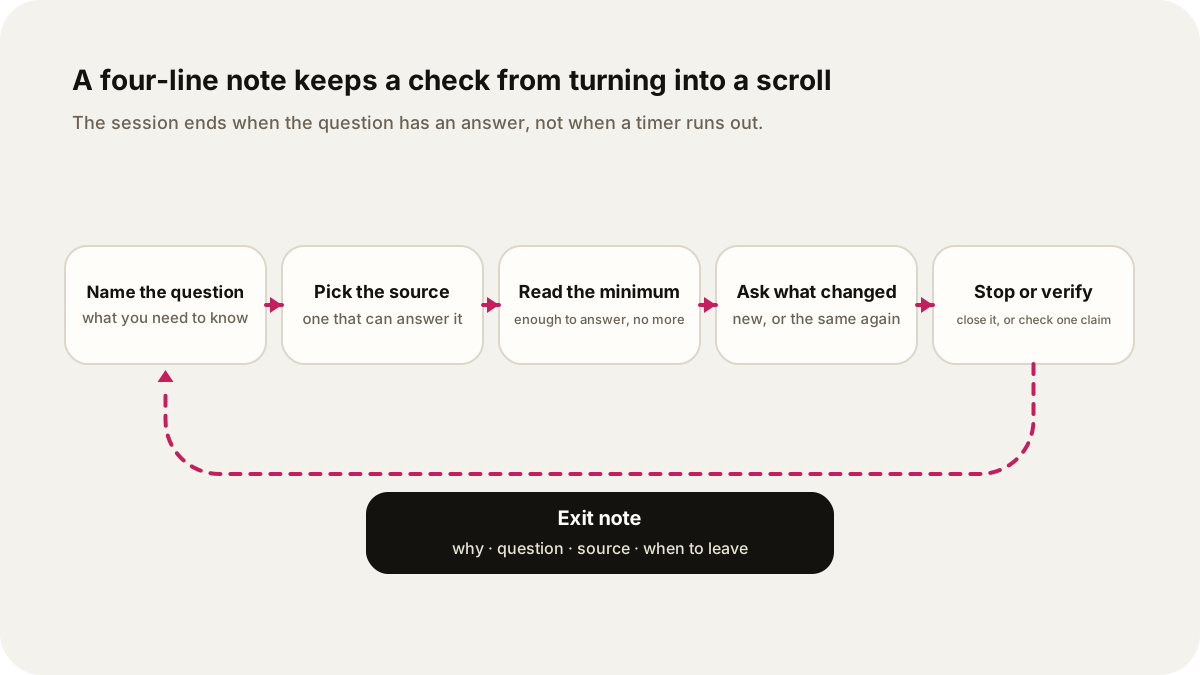
Original illustration: Lissin Editorial.
Keep an exit note beside the feed
Before the next check, fill in four short lines:
I opened this because:
The question I need answered:
The source I will check:
I will leave when:
For a transport check, for example: “I saw an alert; I need to know whether my route is affected; I will check the transport operator; I will leave after checking the affected stops and service times.”
If you notice that you have moved from the service update to unrelated reactions, return to the question. Save an unanswered question for the next planned check instead of letting it turn into an unlimited search.
Start with a question
Before opening a feed, name what you need to know:
- Is there a local safety alert?
- What changed in the court case?
- Do I need to change tomorrow’s travel plan?
- What is the latest public-health guidance?
A question gives the session an endpoint. “See what is happening” gives the feed permission to choose the next topic, the next argument, and the next reason to refresh. If you cannot name a question, write down the topic and return during a planned check instead.
Separate alerts from background reading. A severe-weather warning, transit closure, or official emergency instruction may need immediate attention. Commentary, reaction threads, and ten versions of the same update can wait.
Give the session a stopping rule
Choose the smallest amount of reading that can answer the question. One reliable report may be enough. For a consequential claim, add one independent check or the original document. Then stop and decide whether any action follows.
Ask two questions before opening another tab:
- What changed since my last check?
- What decision does this new information change?
If the answer to both is “nothing,” close the tab. If the answer is “I need to verify this,” go to a source document or a second reporting organization. A reply thread can help you find questions, but it should not become your evidence by default.
A question-based stopping rule works on both quiet and fast-moving news days. A timer can still help, but the session ends when the question has an answer. For a specific short morning schedule, see how to build a 15-minute morning news routine.
Set a last check for the evening
The evening is where a planned check most easily turns into an open-ended one, because nothing else on the schedule ends it. Choose a time for your last news check of the day and give it the same stopping rule as the others: one question, the smallest source that answers it, then close the app.
Three steps make the cutoff easier to keep:
- Pick the time before the evening starts. Tie it to something you already do, such as finishing dinner. The CDC's list of sleep habits includes turning off electronic devices at least 30 minutes before bedtime. If you follow that advice, your last check has to come before it.
- Write down what is still open. If a story is unresolved at the cutoff, add one line to your exit note, such as “Tomorrow I will check whether the vote happened.” The question waits for the morning check instead of the next refresh.
- Choose what comes next. A stopping point is easier to hold when something else is ready: a book, a conversation, or audio on a subject unrelated to the day's headlines.
An unresolved story is the hardest one to leave. Ask the same two questions as before: what changed since my last check, and what decision does it change tonight? Often the honest answer to the second is that nothing can change before morning. Alerts about your immediate safety are the exception; read those when they arrive.
Make the loop harder to enter
Change the environment around the habit so every pause does not become a test of willpower:
- Turn off breaking-news notifications from social platforms.
- Keep alerts from a small number of sources that can give you information you will act on.
- Move social feeds off the first home screen.
- Use a publication’s home page or a newsletter instead of a recommendation feed when you want a defined starting point.
- Keep the phone away from the place where you usually begin an unplanned scroll.
Each change adds friction before the loop starts while preserving access when you have a real reason to check. Make the deliberate session easier to start than the accidental one.
Give each source a job
Source diversity helps when it means different reporting roles, locations, methods, or perspectives. It does not help to collect twenty accounts that repost the same wire story. A short source map is easier to use:
- an official source for instructions or raw public information;
- a local newsroom for what the event means on the ground;
- a specialist or national newsroom for wider context;
- a primary document, study, transcript, or data release when the claim depends on one.
For a health or science claim, check where it came from, when it was published, and whether the relevant public agency or research paper supports it. The World Health Organization’s guidance on disinformation and public health recommends checking the author, outlet, and source of the claims before sharing. Official sources can be incomplete or slow, but a dated source with a clear owner is a better starting point for a safety instruction than an unattributed screenshot.
Sharing deserves its own pause. Check the original source, publication date, location, and whether a headline has been stripped from its context. Search for the quoted language alongside the post that repeats it. If you still share, include the source and any meaningful uncertainty.
What the research can tell you
The evidence gives a reason to set boundaries, while leaving room for context. It does not establish that every news session harms every reader.
| Evidence | Design | What it supports | What it cannot establish |
|---|---|---|---|
| Brief pandemic-news exposure | Two experiments; participants saw two to four minutes of COVID-19 news or comparison material | Brief exposure in those conditions reduced immediate positive affect and, in one study, optimism | The effect of every news format, topic, audience, or longer-term habit |
| News exposure in daily life | 63 people reported news exposure and feelings five times a day for 10 days | More negatively perceived news was associated with more negative and less positive affect | That one news session caused a later feeling |
| CDC emergency guidance | Public guidance for disasters and traumatic events | Use trusted sources, take breaks, and avoid excessive exposure during stressful events | A clinical rule for ordinary daily news use |
When the story is high-stakes
A bounded routine should bend when information affects your immediate safety, work, family, or travel. Use official alerts for instructions and a local reporting source for context. Save key updates somewhere easy to find. If you are responsible for other people, ask someone you trust to compare notes so one person does not have to monitor every channel.
The CDC’s emergency guidance says reactions vary and uses interference with daily activities for several days as a reason to seek professional help. That is a reason to ask for support, not a diagnosis or a prediction about what news exposure will do to you. If news-related distress persists or starts interfering with ordinary activities, consider speaking with a qualified professional.
Run a one-week boundary test
For seven days, record four details after each planned check:
- What question did you open with?
- Which source answered it?
- Did you open an unplanned feed or notification?
- What would make the next session shorter or clearer?
Look for patterns rather than a score. You may find that one source gives you enough information, that late-night updates rarely change a decision, or that one notification starts most unwanted sessions. Change one part of the environment at a time so you can tell what helped.
If repeated coverage is what wears you down, read news fatigue: how to stay current with less repetition. If the starting trigger is the problem, write your question before opening the app. Leave when you can answer it.
Prepare something finite for the planned check
An email briefing, a short podcast or a personal audio show can give your planned check a defined starting point. If you choose Lissin, describe the question from your exit note and select a length that fits the time you set aside. Open a source when you need to verify a claim or act on it.
See the personal-show options on iPhone, or explore existing Lissin audio. Changing the listening format is one choice about the habit; it does not establish that unwanted scrolling or distress will improve.
Sources
- CDC, “Coping with a Disaster or Traumatic Event”
- CDC, “About Sleep”
- World Health Organization, “Disinformation and public health”
- Buchanan, Aknin, Lotun, and Sandstrom, “Brief exposure to social media during the COVID-19 pandemic”
- de Hoog and Verboon, “Is the news making us unhappy?”