
How to keep up with the news without living in a feed
One briefing, one source check, one decision, and then you stop.
Start with one briefing, check one consequential claim, and choose when to return. You need enough information to orient yourself, a clear way to check what matters, and permission to stop before the next alert pulls you back in.
The 2026 Digital News Report from the Reuters Institute found that social media and video networks were used for news by 54 percent of respondents across 48 markets, ahead of news websites and apps at 51 percent. The report also found that 42 percent sometimes or often avoid the news. These figures describe a broad online sample, not a rule about how any one person should read. They do not show which routine will work for an individual reader.
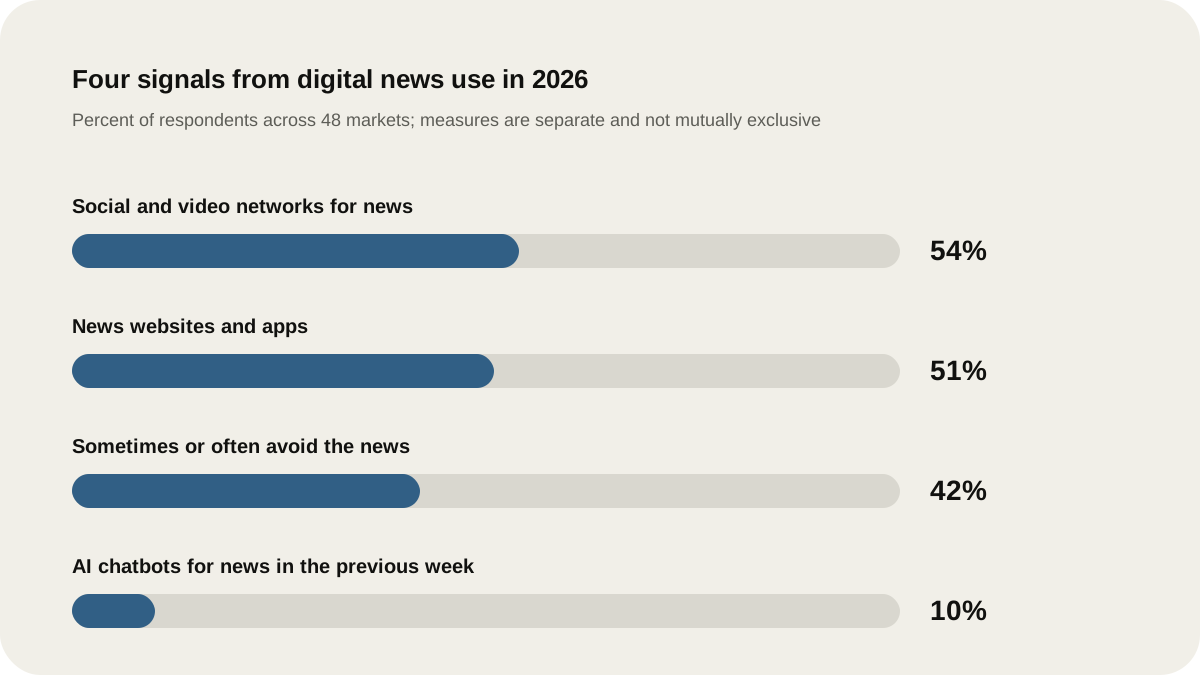
Source: Reuters Institute, Digital News Report 2026. Original Lissin graphic; percentages are reproduced from the report’s executive summary.
Choose a short briefing, check the source behind one important story, and leave the stream unwatched.
Build a 20-minute news loop
You can adjust the clock, but keep the parts finite.
Start with one briefing that gives you the shape of the day. This could be a newspaper’s morning email, a public broadcaster’s bulletin, a podcast, or a short roundup from a publication you trust. Pick one, and give it a time limit of about ten minutes. The goal is orientation: What happened? What changed? Which stories may affect your work, family, money, or community?
Then choose one story for a closer look. Spend five minutes on the publisher’s full article, a government announcement, a court filing, a company statement, a research paper, or the complete interview behind a clipped quote. Investigate selectively, and build a habit around the headlines you may repeat or act on.
Use the final five minutes to make a small decision. Save one link for later, write down one question, or close the app because nothing else needs your attention. A useful briefing should leave you with a map, not a pile of open tabs.
The loop separates two jobs that feeds mix together: noticing what changed and checking what it means. Neither job requires an open stream for the rest of the day.
If you want a shorter first pass, the same structure works as a 15-minute morning news routine: one briefing, one check, and one decision.
Choose sources by job, not by loyalty
One publication rarely covers every subject well. Give each source a job and keep the list short.
For fast developments, look for a newsroom with a visible corrections policy and reporting that names its sources. For public decisions, go to the institution that made the decision when possible: the regulator’s notice, the budget document, the court record, or the full speech. For science and health, look for the study or guidance itself, then read a careful report that explains its limits. For local news, choose the outlet that regularly attends the meetings and knows the names involved.
Build a useful set of sources instead of a perfect ranking of media. Do not ask a single post, personality, or screenshot to do every job at once. A short video may alert you to a story. It is a poor place to leave your understanding if the details matter.
Make a three-line source card for each topic you follow:
- What I use for the first alert: one briefing or outlet.
- What I open for evidence: one direct source or detailed report.
- What I use for disagreement: a second outlet with a different editorial perspective.
That third line is useful when a story is politically charged or when the first account makes a large claim. Compare the reporting and the evidence, not the volume of reactions underneath it.
Choose the adjustment you need
Use the part of the routine that addresses your actual difficulty:
| What keeps going wrong? | Start here |
|---|---|
| You cannot fit a first pass into the morning | Use the 15-minute timer plan. |
| A deliberate check becomes an unplanned scroll | Set a trigger and exit in the doomscrolling guide. |
| Different sources keep repeating the same story | Run the duplicate-coverage audit. |
| One continuing story requires too much rereading | Keep a background note and update log. |
Put friction between you and the feed
Most people need fewer invitations to check, which is more useful than another willpower plan.
Turn off general breaking-news notifications. Keep alerts only for a narrow set of things you genuinely need in real time, such as a severe weather warning, a local emergency, or a work-specific update. Move social apps away from your first home screen. Read the briefing from an email, podcast app, RSS reader, or saved bookmark rather than opening a recommendation feed first.
Choose two windows for news, perhaps 8:15 a.m. and 5:30 p.m. Outside those windows, save the link. If a story still matters at the next window, it will be there. If your work requires live monitoring, set a defined watch period and a person who can hand off the watch. “Keep an eye on it” is how a ten-minute check turns into an afternoon of partial attention.
Audio can help people who do not want another screen in the morning. Keep the source link nearby for stories that affect a decision, and do not let a convenient summary become your only record of what was reported. The useful part here is the boundary: the briefing starts and ends at a known time.
For a fuller reset of alerts, feeds, and stopping points, see how to stay informed without doomscrolling.
A weekday example
Consider a weekday example with Sarah, who works in a small technology company and wants enough context to participate in conversations about markets, regulation, and world events. She keeps one general morning briefing and two specialist sources: a publication that covers her industry and a local outlet.
At 8:10, she listens to the briefing while making breakfast. At 8:20, she opens one story that could affect her team and reads past the headline. She checks the linked filing or announcement if the story includes a number, a new rule, or a claim from a public figure. At 8:25, she writes one sentence in her notes: “Watch the next update on the regulation; no action today.” By 8:30, she has saved any follow-up and closed the news apps.
At 5:30, she spends five minutes checking whether that story changed. If it did, she saves the new source. If it did not, she leaves it alone. On weekends, she spends 20 minutes clearing saved links. Anything that no longer matters gets deleted. Anything that still matters gets a place in next week’s briefing.
Her system is modest on purpose. It gives her a repeatable way to know what deserves attention without turning every spare minute into a referendum on the state of the world.
Use AI summaries with a source attached
The 2026 Reuters Institute report says 10 percent of respondents used AI chatbots for news in the previous week, up from 7 percent the year before. It also says usage is concentrated among younger audiences and people who are already highly interested in news. A summary can be useful for finding the vocabulary of a story or generating follow-up questions. It should not be the final stop for a consequential claim.
If you use an AI summary, ask for links to the underlying reporting and open them. Check dates, names, numbers, and whether the source supports the sentence you are about to repeat. If the links are missing, vague, or unrelated, treat the summary as a prompt for further reading rather than as evidence.
Let convenience choose the next source, then open that source before you repeat the claim.
Give yourself a weekly reset
Once a week, ask three questions:
- Which source helped me understand something clearly?
- Which source made me anxious without adding useful information?
- Which topic deserves a deeper read, and which topic can leave my list?
Remove sources that keep you in a state of anticipation. Add a source only when you can say what job it will do. A smaller list usually makes it easier to notice repetition, missing context, and unsupported claims.
If repeated coverage is the problem, pair this reset with a guide to staying current with less repetition.
Your news habit needs a dependable path from “something happened” to “I understand enough to decide what I will do.” Once you reach that point, close the feed.
Turn your source card into a show brief
If the briefing you want does not exist, make it around your source card. Choose the subjects, add the sources, and set the recurrence in Lissin. Try this request:
Make a short weekday show about the two topics on my source card. Use my chosen publications for the overview, look for the original document behind major announcements, and explain one unanswered question worth following up.
Choose a length that leaves room for the source-check stage. The request describes what you want; check the episode against your sources before making it part of the routine. See Lissin's iPhone creation options, or listen to existing shows on the web.
Sources
- Reuters Institute for the Study of Journalism, Digital News Report 2026: executive summary.
- Reuters Institute for the Study of Journalism, Digital News Report 2026: methodology.
- Boczkowski, P. J., et al. (2018), "Incidental news consumption on social media: A conceptual synthesis": analysis of cognitive fragmentation and threat vigilance caused by continuous algorithmic feeds.
- Goyanes, M., et al. (2021), "The psychology of news avoidance: Emotional costs and cognitive coping mechanisms": empirical study on boundary-setting and scheduled news consumption reducing anxiety.