
How to follow a fast-moving story without rereading the background
Write the background once, then track what changed. A dated note lets you resume a story and correct earlier assumptions.
A fast-moving story can make you feel busy without making you better informed. Each new article repeats the origin story, the familiar names, and the first confirmed facts. The detail you need, the thing that changed since you last looked, sits somewhere in the middle.
Keep one stable note for the background. Record only what changed at each update, label every date, open the original document when one exists, and leave uncertainty visible. The result is a deliberate rhythm for following a story, much like the bounded routine in our guide to reducing news fatigue.
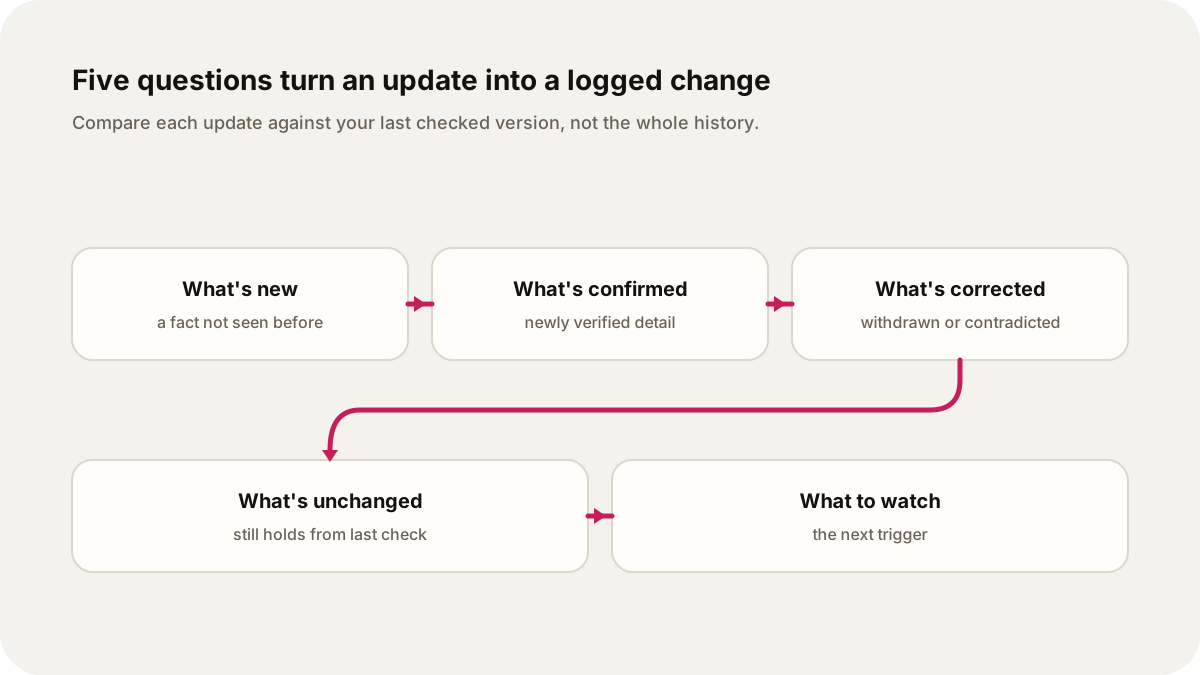
Original illustration: Lissin Editorial.
Keep a seven-line handoff note
When you finish a session, leave enough information for your future self to resume without rereading everything:
Story:
Last checked: date, time, and time zone
Stable context: one or two sentences
Since the previous check: what changed
Evidence: source, document date, and link
Uncertainty: what is disputed or missing
Next trigger: the event or document worth checking
Put the note somewhere you can edit, not in a disappearing tab. Link the latest primary document and keep the prior entry beside it. When the story moves again, open the log and read the change first.
Write the baseline once
Before following a story, write a short baseline. Keep it to the facts that are unlikely to change from one update to the next:
- Who or what is involved?
- What happened first?
- Why does the story matter now?
- Which terms, agencies, companies, or people need explaining?
- What question are you watching for an answer to?
Date the note and add a time zone. “Background, checked 18 August at 09:00 IST” is more useful than a paragraph with no edge on it. If the baseline later turns out to be wrong, correct it in place and leave a note about what changed. Do not keep carrying an old premise because it appeared in your first summary.
The baseline is a map: enough to explain the names, institutions, and open question. Put everything else in the update log.
Give every date a job
Stories often contain several dates, and they do not mean the same thing. Put the date beside the claim it describes rather than leaving one timestamp at the top of a page.
| Date label | What it tells you |
|---|---|
| Event date | When the underlying event happened, if known |
| Publication date | When a source first made its account public |
| Update date | When that source changed or added to its account |
| Document date | When a filing, order, report, or statement was signed or issued |
| Effective date | When a decision or rule begins to apply |
| Retrieval date | When you checked the source |
The difference can change the meaning of a story. A rule may be published on one day and take effect later. A company may file a document after an event but describe an earlier reporting period. A live page may show a current update while preserving the original publication date. The Federal Register’s rulemaking guide is a useful official example of why publication and effective dates need separate fields.
Use the source’s own time zone when it provides one. If you convert it, keep the original time in your notes. That makes it easier to compare a post, filing, hearing, or announcement without quietly moving an event across a calendar day.
Log what changed
When a new update arrives, compare it with your last checked version. Ask five questions:
- What is genuinely new?
- What is newly confirmed?
- What has been corrected, withdrawn, or contradicted?
- What remains unchanged?
- What should you watch next?
Write the answer in four lines: new fact, source, why it matters, and open question. If the update adds nothing material, say so and record the check. “No material change; two outlets repeated the earlier account” is useful. It keeps repetition from masquerading as movement.
Here is a fictional example showing the format; it does not describe an actual agency order:
18 Aug, 09:00 IST
New fact: The agency posted the final order, not another proposal.
Source: Link to the order; posted 17 Aug, 16:30 UTC.
Why it matters: The order names the next deadline.
Open question: Whether the deadline applies to existing cases.
Keep the old entry. A timeline is more than a memory aid; it lets you see how a claim changed. If a headline says “officials reverse course,” you can check whether the official document reversed a decision or only changed the explanation around it.
Start with the document closest to the decision
An original document is usually the best place to check what an institution formally did. It is not automatically a complete explanation, and it may contain legal, technical, or political language that needs reporting around it. Use it to verify the action, date, scope, and exact wording. Use careful secondary reporting to explain consequences and disagreement.
The right primary source depends on the story. For a public company, search the SEC’s EDGAR filings and note the form, filing date, and period covered. For a bill, amendment, or law, check the bill’s actions and text versions on Congress.gov. For a public-health event, the World Health Organization’s Disease Outbreak News provides date-stamped situation updates. For a regulation, check the Federal Register entry and the text of the rule rather than relying on a post that describes it.
Save the document link in your log with its title, issuing body, date, and supporting section. If the page is likely to change, save a permitted copy or stable PDF and record when you retrieved it. A link without a date is hard to audit later.
An original source establishes a narrower fact than many readers assume. A press release records the institution’s account of what it wants known. A filing is a formal disclosure, not a guarantee that every assertion is true. A court order records what a court ordered; it may not settle the factual dispute around the case. Use the source to establish what was said or done, then separate that evidence from interpretation.
Keep uncertainty in the sentence
Fast stories invite premature certainty. A useful update separates three layers:
- Confirmed: the document or directly attributable source states it, and the wording supports your description.
- Reported or likely: a credible report gives the detail, but the underlying evidence is not public or complete.
- Open: the claim is disputed, unverified, or waiting on a document, hearing, test, or response.
Use those labels in your notes and in your prose. “The filing says the company expects a delay” is different from “The project will be delayed.” “The agency announced an investigation” is different from “The agency found wrongdoing.” The first sentence in each pair describes a source. The second makes a conclusion that may not yet be supported.
When sources disagree, preserve the disagreement and identify what would resolve it. “The ministry says the count is 42; the local authority lists 39; neither has published the underlying table” is more useful than choosing the larger number because it appeared in the latest update. Uncertainty is part of the current state of the story, not an editing defect.
If you use an AI-generated news summary as a first pass, check the dates, links, names, and quoted language against the underlying sources. Our source-first verification guide explains how to test a summary without treating its smooth prose as evidence.
Use a stop rule
Following a story becomes exhausting when every refresh feels like a decision. Set a rule before you start. For example: check the named sources at 9 a.m. and 6 p.m.; check again only if a direct alert reports a new document, decision, or safety instruction.
At each check, look for a meaningful delta. A new headline, longer quote, or faster social post does not necessarily qualify. If there is no change, close the tab. For a consequential story, write the next trigger in your note: “Return when the ruling is published,” “check after the hearing,” or “wait for the agency’s data table.”
A stop rule protects the baseline too. Without one, you keep rereading context because the page keeps presenting it as new. The change log gives you a place to return without starting over.
Let an audio briefing lead with the change
An audio briefing should not make a listener sit through the origin story on every episode. If you turn a change log into audio, let the structure follow the tracking system:
- Since the last update: the one or two material changes, with their dates.
- Why they matter: a short return to the baseline, only where it helps the listener interpret the change.
- What is still uncertain: disputed claims, missing documents, and the next expected trigger.
- Source trail: the issuing body, document title, and date, with links in the show notes or public source panel.
Give the new information most of the time. Keep stable context available as a short “previously” segment or a linked editorial summary. If nothing material changed, the briefing can say that plainly and point to the next check. It does not need a new dramatic introduction to justify its existence.
Source links and a visible correction path matter in audio because a listener cannot inspect a page while listening. Our guide to trust in AI-generated audio covers the source, correction, and version details that make a narrated briefing easier to assess.
Use your note to request the next audio update
Choose the story and sources for a recurring Lissin show. Use your handoff note to ask for the next update:
Follow this story using the sources and background note I provide. Start with developments since the date in my note. Name their dates, explain what remains disputed, and finish with the next document or event worth checking.
Choose a schedule appropriate to the story. Review whether the resulting episode answered the brief; a request to focus on changes does not guarantee complete coverage or eliminate every repeated detail. Keep your own dated note and reporting links for decisions that depend on an exact number, deadline or quotation.
See how personal shows work on iPhone, or explore existing Lissin audio.
Sources
- Office of the Federal Register, The Rulemaking Process: official guide to proposed rules, final rules, publication, and effective dates.
- U.S. Securities and Exchange Commission, Search Filings: official EDGAR access for company and other public filings.
- Congress.gov, About Legislation: official help page for bill records, actions, and text versions.
- World Health Organization, Disease Outbreak News: official date-stamped updates for public-health events.