
Plan commute audio for no signal, on foot and at the wheel
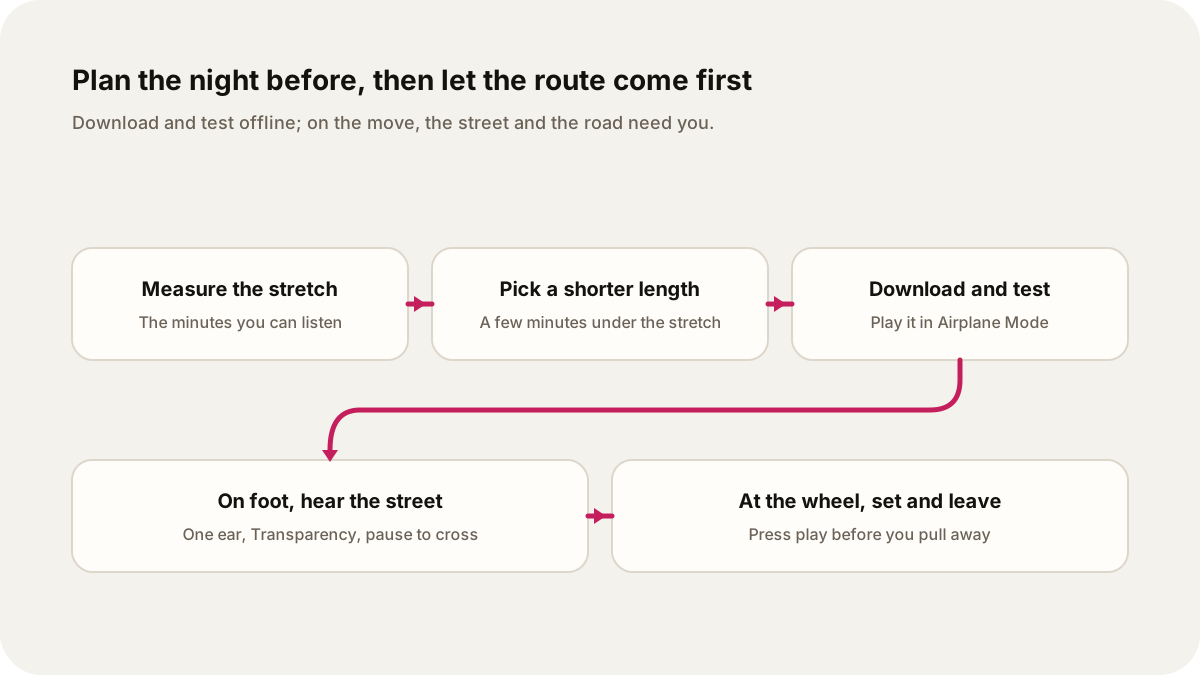
Choose and download the episode the night before, size it to the minutes you can actually listen, and let the street and the road come first.
Plan the audio for a journey the night before, while you still have a signal and time to think. Measure the part of the trip where you can actually listen, choose an episode a few minutes shorter than that stretch, and save it to your phone so it plays underground or on a remote path. Then test it without a connection before you leave.
On foot, keep enough hearing for the street: one earbud, a transparency mode, or a lower volume, and a pause at every crossing. At the wheel, start the episode while parked and leave the phone alone until you stop again. A show can give a familiar route a subject. It cannot make driving or walking safer, and it is not a treatment for driving anxiety.
Download before you lose the signal
Streaming needs a connection, and tunnels, deep stations, and rural paths are where it drops. A downloaded episode is stored on the phone, so it keeps playing when the network does not.
In the Lissin iPhone app, you can download an episode for offline listening. The web player at web.lissin.com plays shows in a browser, so it needs a connection; use the app for a trip underground. Lissin makes an episode in minutes, but give it time to finish before you rely on it. A scheduled show that has not finished making its next episode is not ready, however close the departure.
Two checks are worth the minute they take:
- Is it finished? Open the episode and confirm it plays from the start.
- Is it on the phone? Turn on Airplane Mode, press play, and skip ahead once. If it plays, it will play in the tunnel. Turn Airplane Mode off again afterwards.
The same applies to any podcast app. A title in a queue or a download that stalled at 80 percent will look ready until the moment you need it.
Match the episode length to the journey
Start with the listening stretch, not the door-to-door time. A 35-minute commute might include a walk to the station, a wait on the platform, a ride, a change of line, and another walk. Only some of those minutes suit an episode that needs your attention.
For reference, the US Census Bureau reported an average one-way commute of 27.6 minutes in 2019, and 46.6 minutes for people who travelled by bus. Your own route is the number that matters, so time it once.
Then choose a length a few minutes shorter than the stretch. Announcements, a crowded doorway, or a platform change will take some of that time. When you make a Lissin episode, you choose its length, so you can ask for 12 or 15 minutes instead of taking whatever is next. Treat the length as a guide, not a stopwatch.
If the episode runs past your stop, leave it. You can come back to the rest on the way home. A subject that splits cleanly into parts makes that easier, and picking up an unfinished episode works best when you remember the last point you understood. For other short stretches, such as cooking or chores, matching the episode to the time you have follows the same logic.
For a long walk
A long walk changes the arithmetic. You may have 90 minutes, but they are rarely 90 quiet minutes. Split the subject into two or three shorter episodes rather than one long one, and download all of them before you leave signal. A park section suits a detailed explanation; a stretch along a busy road suits a pause or nothing at all.
Walk with your ears on the street
The UK Highway Code asks pedestrians to "look all around for traffic and listen", because you can sometimes hear traffic before you see it. Its rules for pedestrians also say to keep looking and listening while you cross.
The risk is not hypothetical. A 2012 case series in Injury Prevention found 116 reports from 2004 to 2011 of pedestrians wearing headphones who were killed or injured in crashes with trains or motor vehicles. Trains were involved in 55 percent of them, and 29 percent mentioned a warning sounded before the crash. A case series cannot say how often headphones cause crashes. It does show what a missed horn can mean.
Practical settings for walking:
- One earbud out near traffic, at stations, and on shared paths.
- Transparency mode if your earbuds have it. Apple describes Transparency mode on AirPods as letting you hear the sounds around you, while Active Noise Cancellation blocks outside noise. Switch to Transparency before you leave the train.
- Lower volume. The WHO's safe listening advice is to keep your device at no more than 60 percent of maximum.
- Pause at crossings, junctions, and level crossings, then resume once you are across.
There is a sensible split here. On a loud train, the WHO suggests well-fitted, noise-cancelling headphones so you do not need to raise the volume. On the street, you want the opposite: outside sound coming in. Change modes when you change settings.
At the wheel: choose before you start
Pick the episode, download it if your route loses coverage, and press play before you pull away. If it is the wrong choice, switch it off or wait until you can stop safely. Do not browse, type a request, or scroll a queue while driving.
The law is strict about handheld phones. In Great Britain, GOV.UK says it is illegal to hold and use a phone while driving, including when you are stopped at traffic lights or queuing in traffic. The penalty is 6 points and a £200 fine. Hands-free use is allowed only if you do not hold the device at any time, and police can still stop you if they think you are not in control because you are distracted. Rules differ elsewhere, so check the law where you drive.
Safety guidance goes further than the law. The CDC describes three kinds of distraction: visual (eyes off the road), manual (hands off the wheel), and cognitive (mind off driving). Audio avoids the first two only if you leave the screen alone. A 2013 AAA Foundation study found that listening to the radio was not very distracting, while phone conversations and in-car speech-to-text systems placed a high mental load on drivers. That is a reason to set up the show while parked rather than talk to your phone on the move.
If driving makes you anxious, a show will not fix that, and you should not choose one expecting it to. Pick something because you want to hear it. A subject you can drop and pick up again is easier to set aside when traffic gets busy. When the road needs all of your attention, turn it off.
A worked example: a 35-minute commute
Here is a made-up route, planned at 9pm the evening before:
| Leg | Time | Listening plan |
|---|---|---|
| Walk to the station | 8 min | Nothing, or Transparency mode at low volume; two road crossings |
| Platform and boarding | 4 min | Start the episode once on the platform |
| Train, mostly underground | 18 min | Main listening stretch; no signal for about 12 minutes |
| Walk to the office | 5 min | Pause at the exit; finish later |
The listening stretch is about 22 minutes, from the platform to the station exit. Allowing for announcements and a crowded exit, a 15-minute episode fits with room to spare.
At 9pm: make the episode, wait for it to finish, and download it in the app. Turn on Airplane Mode, play the first few seconds, skip to the middle, and turn Airplane Mode off. In the morning, walk to the station with one earbud in or nothing playing, switch to noise cancellation on the train, and press play on the platform. At the exit, switch back to Transparency or take the earbuds out. If two minutes are left, they can wait for the ride home.
If you take this route every weekday, a recurring show can make a new episode on a daily schedule. Check that the morning's episode has finished and downloaded before you leave, the same way you would a one-off. For a news-based version, the 15-minute morning news routine shows how to split listening from checking a source.
Make a show around it
Example request, to make the evening before:
Make a 15-minute episode explaining how cities dig subway tunnels under existing streets, using one well-known line as the main example. Use one calm narrator, keep the background brief, and end with a short recap so I can stop at my station.
Choose the length to fit your own listening stretch, download it in the app, and test it offline before you go.
Sources
- GOV.UK, "Using a phone, sat nav or other device when driving": handheld use is illegal including at traffic lights and in queues; 6 points and a £200 fine; hands-free only without holding the device; police can stop distracted drivers.
- Centers for Disease Control and Prevention, "Distracted Driving": visual, manual, and cognitive distraction.
- AAA Foundation for Traffic Safety (2013), "Measuring Cognitive Distraction in the Automobile": radio listening rated not very distracting; phone conversations and speech-to-text systems placed a high cognitive demand on drivers.
- Lichenstein, R., Smith, D. C., Ambrose, J. L., & Moody, L. A. (2012), "Headphone use and pedestrian injury and death in the United States: 2004-2011," Injury Prevention: 116 case reports; 55 percent involved trains; 29 percent mentioned a warning.
- GOV.UK, The Highway Code, "Rules for pedestrians (1 to 35)": look and listen for traffic, including while crossing.
- World Health Organization, "Deafness and hearing loss: Safe listening": keep volume at no more than 60 percent of maximum; use well-fitted noise-cancelling headphones in noisy places.
- Apple Support, "Switch between listening modes on AirPods 4 (ANC), AirPods Pro, or AirPods Max": Transparency mode and Active Noise Cancellation.
- US Census Bureau (2021), "Census Bureau Estimates Show Average One-Way Travel Time to Work Rises to All-Time High": 27.6-minute average one-way commute in 2019; 46.6 minutes by bus.