
Lost the thread of a podcast? How to pick it up again
The player saved the timestamp. Find the last section you can explain, then choose whether to continue.
Your podcast resumes at minute twenty, but you cannot remember why the host just mentioned a court case or which question the guest was answering. The timestamp is right. You still need some context before the next sentence makes sense.
Start by returning to a section boundary rather than replaying the whole episode. Chapters, notes, bookmarks, and a short reminder can help you find that point. If you no longer want the episode, you can leave it unfinished; the goal is useful listening, not an empty queue.
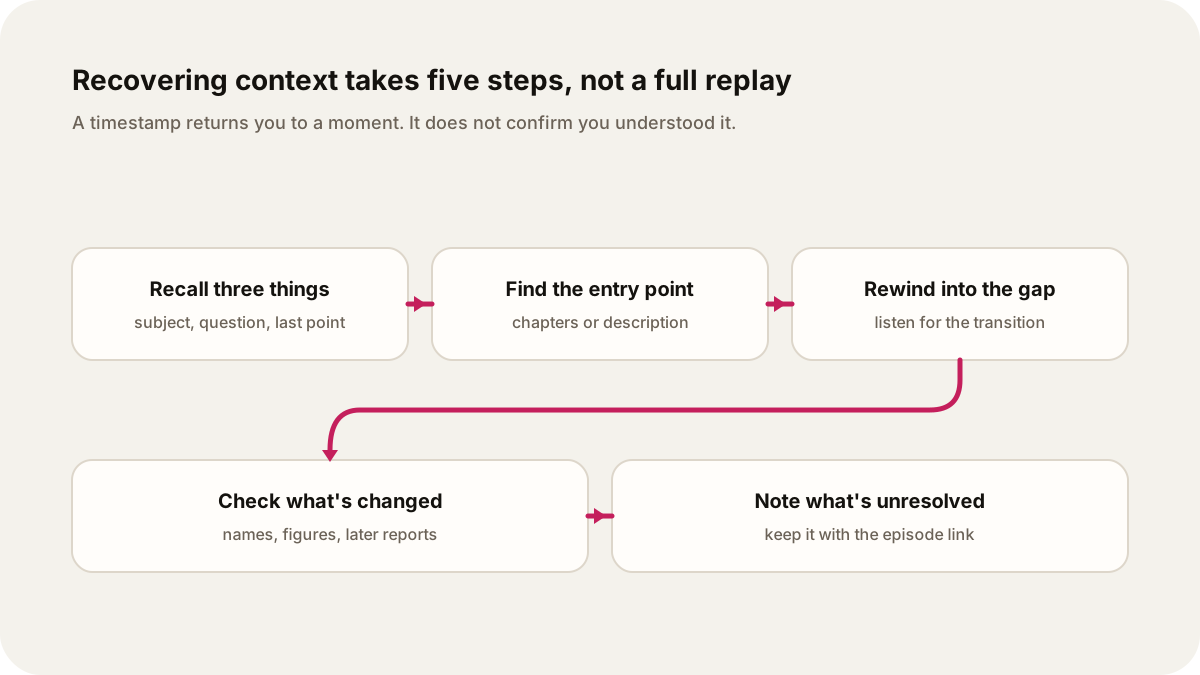
Original illustration: Lissin Editorial.
Find the last part you can explain
Pause and ask what you remember: the subject, the current question, and the last point you understood. If you can name those, rewind a little and listen for the transition into the passage you missed.
If you cannot, look at the episode description and chapter list. Choose the most recent section whose subject you recognize. Read any relevant notes before resuming, especially for names, figures, or a story that has changed since the recording was published.
A simple reminder for next time is enough:
Paused during the section on local bus routes. The council has voted on the proposal; I still need to hear when the change takes effect.
Keep a note like this. It records what remains to be answered without trying to summarize the whole show. Keep it with the episode link or in a bookmark if your player supports notes.
What existing tools actually restore
| Tool | What it helps with | What it does not establish |
|---|---|---|
| Playback position | Returning to the same moment | That you remember or understood the preceding explanation |
| Chapters | Finding a named section | A summary of everything you heard |
| A bookmark or your own note | Returning to a point you marked | Automatic recovery of the material between markers |
| A recap | A shorter reintroduction to covered material | The full argument, exact wording, or your personal understanding |
Apple's current creator documentation describes automatic chapters when eligible episodes do not have suitable creator-provided chapters. Availability depends on the documented conditions, including transcript generation. Check the episode's actual chapter list rather than assuming every show has one.
Pocket Casts documents Bookmarks for manually marking moments. A bookmark is most useful when you leave enough context to recognize why that moment mattered.
Spotify's November 2025 Audiobook Recaps announcement describes a beta feature for catching up within a supported audiobook. That is a real example of rebuilding context, so it would be wrong to say mainstream audio products never do it. The announcement does not establish that every podcast has recaps or that a recap follows your understanding across different shows. Check availability for your title and device.
A recap and the original do different work
A recap can orient you, but it selects and compresses. Return to the original passage when you need the speaker's exact qualification, evidence, or wording. For a statistic you plan to repeat, open the underlying source rather than treating another summary as verification.
You may prefer replaying a whole section because the examples are the reason you chose the episode. That is a good reason to skip a recap. You may also decide that a short reminder is enough to continue. Listening versus reading a long article offers a similar distinction between following an argument and inspecting a claim.
If you switch to a different episode about the same developing story, check its date before assuming it continues where the previous one stopped. The newer show may use a different definition, focus, or source. A short note of what changed is useful; this developing-story workflow explains how to keep that separate from stable background.
Recurring shows remember a different kind of context
A recurring Lissin show keeps its purpose, sources, creative direction, and prior coverage so the next episode can focus on what changed.
A show’s previous coverage is different from your listening place. Keep a bookmark or your own note after an interruption; do not assume the next episode knows which minutes you heard or understood.
For a recurring show, try: “Follow changes to urban cycling infrastructure each week. Lead with new decisions, explain why they matter, and keep repeated background brief.” That asks for continuity across episodes. For an individual episode you have lost track of, use its notes and playback controls to recover your place in the argument.
Hear an existing recurring show in the US Tech Buzz Daily archive. Use its episode dates and descriptions to choose where to start, and check important claims against their sources.
Before leaving your next episode, write down the question still open. That one detail gives you a place to resume even if the player has only saved a timestamp.
Sources
- Apple Podcasts for Creators, Chapters on Apple Podcasts: current chapter-generation documentation.
- Pocket Casts Support, Bookmarks: manual episode markers.
- Spotify Newsroom, Introducing Audiobook Recaps: November 2025 beta announcement and within-book scope.
- Lissin for iPhone.