
Listening vs. reading a long article: when each works best
A full reading, a summary, and a personal explanation serve different jobs. Choose the one you need and keep the source.
A long article asks for more than a spare half-hour. It asks you to keep a thread in your head, notice how the evidence fits together, and remember where a claim came from. That makes the choice between reading and listening feel like a choice between two learning tools.
No universal rule works here. Listening can make an article possible when eyes, hands, time, or print itself are the barrier. Reading works better when you need to scan, compare, quote, or check a source. Many articles call for both.
Ask: “What do I need to do with this article?”
Original illustration: Lissin Editorial.
| Your next task | Better first format | Keep the other format for… |
|---|---|---|
| Follow a narrative or get started while your eyes or hands are occupied | Audio | Checking a name, number, quote, or source |
| Scan the structure, compare passages, or find a specific detail | Text | Hearing tone, chronology, or the whole through-line |
| Make a consequential decision or repeat an exact claim | Text | Building context before the verification pass |
| Work around visual fatigue, low vision, a reading disability, or a screen that is impractical | Audio with full controls | Searchable text, citations, and recovery from a missed phrase |
| Remember the argument later | Either, followed by retrieval practice | Testing the main claim, support, and limitation from memory |
When listening is the better first move
Audio helps when the main problem is access rather than analysis.
Someone with low vision, visual fatigue, a reading disability, or a motor condition may find spoken text easier to enter. A listener may also have a useful window during a walk, commute, or routine task when a screen is impractical. Those are real reasons to choose audio, even if reading would be faster in an ideal desk-and-screen setup.
Listening can also lower the friction of starting a very long piece. A voice gives the article a pace and a sense of forward motion. That does not prove that audio creates better understanding. It can mean that a person reaches the middle of the article instead of abandoning the first screen.
Audio is especially well suited to writing with a strong narrative line: a reported story, a personal essay, a history with clear chronology, or an interview that depends on voice and tone. You can follow the sequence without stopping to decode every paragraph. If a detail matters later, you can pause or return to the relevant time stamp.
There is a catch. Listening turns the article into a stream. You cannot see the next heading while you are processing the current paragraph. A missed name, qualification, or negation can pass by before you notice it. Noise, an unfamiliar accent, a fast narrator, or divided attention can make a demanding passage harder to hold onto.
Audio should therefore come with controls that respect the listener: pause, rewind, speed adjustment, a visible progress position, and access to the readable article. The text lets a listener confirm a phrase, search for a term, and recover from a moment of inattention without requiring the production script to be public.
For a shorter version of the same format choice, compare an audio news briefing with a news podcast. The useful distinction is still the job each format performs, not a permanent ranking of audio and text.
When reading still has the edge
Text gives you a map of the article. Headings show the shape of the argument. Paragraph breaks reveal emphasis. A table, pull quote, footnote, or chart can put several pieces of information in view at once.
That matters when you are scanning before committing. You can read the introduction, check the headings, jump to the section that answers your question, and decide whether the rest is worth your time. Find-in-page can take you to a person, date, technical term, or caveat in seconds. Audio can offer chapter markers, but a text page makes the whole structure visible at once.
Reading is also the safer choice when the article is dense or exact. Policy, medicine, law, science, technical instructions, and financial reporting often contain terms that need a second look. A written sentence lets you inspect spelling, punctuation, units, and qualifiers. You can place the article beside another source, copy a short passage for your notes, or open a citation without losing your place.
“I listened to it” and “I checked it” describe different work. Listening can help you understand the broad claim. Text helps you audit it. If you are making a decision, writing a report, or repeating a statistic, keep the readable source open.
Reading also makes stopping less expensive. You can leave a bookmark between two paragraphs and return later. With audio, a pause may preserve the time stamp, but it does not show the surrounding context. You may remember the sentence without remembering whether it was evidence, an example, or the author’s limitation.
What the research says about comprehension and retention
The research does not support a simple “reading wins” or “audio wins” conclusion.
In a 2016 experiment, Rogowsky, Calhoun, and Tallal assigned college-educated adults to read an electronic text, listen to an audiobook, or do both at the same time. The material came from a nonfiction book. The groups performed similarly on an immediate comprehension test and on a two-week retention test. Its participants were English-speaking adults aged 25 to 40, and the material was one book excerpt. That is evidence against a universal disadvantage for listening, not proof that every article works equally well in every format.
An earlier classroom study by Daniel and Woody reached a different result. Students who listened to a podcast of a primary-source article scored lower on a later quiz than students who read the article. The authors also reported that students initially preferred the podcast, then changed their view after taking the quiz. The study is a useful warning about passive listening, but it does not describe every audiobook listener: the setting, article, test, and opportunity to study all shape the result.
Leroy and Kauchak’s 2019 studies used short health-information passages. Text and audio produced similar performance on multiple-choice comprehension. When participants had to freely recall wording, text had an advantage. Repeated presentation improved performance. That finding points to a practical distinction: recognizing the right answer is different from retrieving a claim without help.
These studies measure specific tasks under specific conditions. They do not establish that listening improves memory, that reading always produces deeper understanding, or that playing audio in the background counts as learning. Retention depends on the article, the listener, the environment, the speed, the test, and whether the person reviews or retrieves the material afterward.
If long-term recall matters, use a method that tests recall. Pause after a section and write three sentences from memory. State the author’s main claim, one piece of evidence, and one limitation. Then check the text. That practice is more informative than a feeling of familiarity while the narrator is still speaking.
Accessibility is a format question, not a format contest
Offering audio does not make a long article accessible by itself. Some people need speech. Others need text. Some need both, with control over pace and presentation.
For prerecorded audio-only content, WCAG 2.2 Success Criterion 1.2.1 calls for an alternative that presents equivalent information, except when the audio is itself a clearly labeled alternative to existing text. A summary of an article is not automatically equivalent to a full reading of it. Match the text alternative to what the recording actually contains.
For a listening version of an article, publish the readable article alongside it. Label the audio as an alternative, keep headings and links available in text, and make the player operable from a keyboard and assistive technology. Keep citations in the readable article rather than hiding them behind the player. Do not assume every listener can hear the same distinctions in music, emphasis, names, or pronunciation.
A flexible experience lets a reader start with text, switch to audio, and return to the exact paragraph. A listener can hear the piece, open the readable article for a quote, and check the source before sharing it.
A hybrid workflow that respects the job
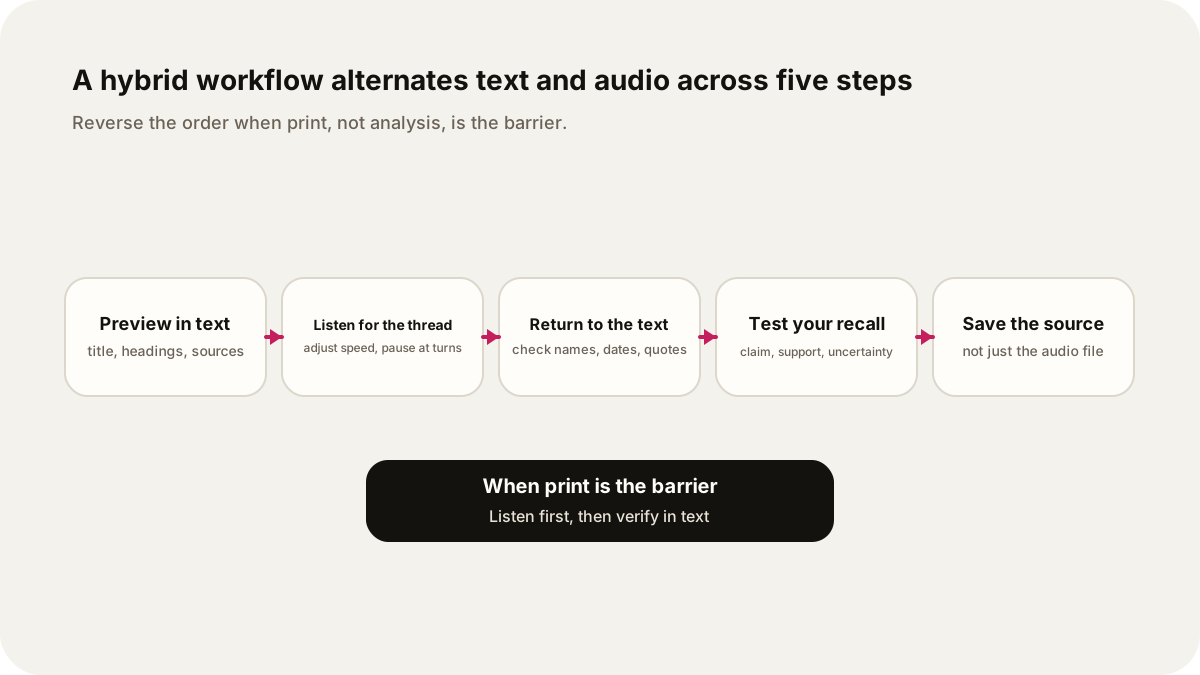
Try this sequence for a long article:
- Preview in text. Read the title, introduction, headings, author information, and source list. Decide what you need from the piece.
- Listen for the through-line. Use audio for the narrative, explanation, or overview. Adjust the speed until the voice remains easy to follow. Pause when a section changes direction.
- Return to the important passages. Open the article. Check names, dates, numbers, quotations, definitions, and caveats in the written source.
- Test your recall. Without looking, write the main claim, the strongest support, and the biggest uncertainty. If you cannot do that, revisit the section instead of turning up the speed.
- Save the source, not only the audio. Keep the article URL and citation with your notes. An audio file is a route into the material; it is not a substitute for provenance.
You can reverse the order when print is the main barrier. Listen once to build context, then use the text only for the passages you need to verify. You can also split by section: listen to the reported narrative, read the methodology, and return to the article to check a quote.
If you want to make the first pass part of a bounded routine, try a 15-minute morning news routine. For the production side of turning research into something listenable, see how AI turns research into a personalized audio show.
When the long read is a backlog
Sometimes the long article is twenty saved newsletters and bookmarked pieces. The same question applies one level up: what do you need to do with this folder? Clearing it in one sitting is rarely the job. Sort it first.
- Pull out what needs reading. Pieces with tables, charts, instructions, or claims you plan to quote stay in text.
- Group the rest by question. Two articles about grid storage can share one episode: “What are the trade-offs between grid batteries and pumped-storage hydropower?” An essay on batteries, a restaurant review, and a database tutorial are three different jobs. Make separate episodes, or leave some unplayed.
- Choose a full reading or an explanation for each group. For a single article you want word for word, a full reading fits. On iPhone, Safari can read supported webpages aloud with Listen to Page. For two or three related pieces, an explanation across them can show where the authors agree and disagree. Lissin can use newsletters, links, and articles as sources for a show; ask it to name which author makes each claim so the disagreements stay visible.
- Keep the links. Hearing a summary of the folder is not proof that every detail was covered. Archive or delete the originals on your own schedule, not because an episode played.
A paid or private page may need access you already have, or a copy you can provide. Add only sources you have permission to use.
A full reading and a personal show are different choices
If you want every sentence of the original article, choose a full reading or text-to-speech version and keep the article available. If you want a shorter summary, expect omissions and check whether they matter to your purpose. If you want an explanation shaped around your own question, a researched personal show can take a different route through the material.
In Lissin, choose a topic or sources, the direction, the voice, and the length. For an explanation rather than a full reading, try: “Use this report to explain the main argument to a beginner. Keep its important qualifications, separate findings from predictions, and tell me which sections I should read myself.”
Keep the original report with the episode. Open its tables and exact claims before quoting or acting on them, and use the audio for the part of the job it actually serves.
Sources
- Rogowsky, Calhoun, and Tallal (2016), “Does Modality Matter?”
- Daniel and Woody (2010), “They Hear, but Do Not Listen”
- Leroy and Kauchak (2019), “A comparison of text versus audio for information comprehension”
- W3C, Understanding WCAG 2.2 Success Criterion 1.2.1
- Apple Support, “Listen to a webpage in Safari on iPhone”