
Turn a device specification into a personal audio brief
A USB-C connector does not identify a data speed. Read the published USB limit and cable requirement, then label any bits-to-bytes arithmetic as hypothetical.
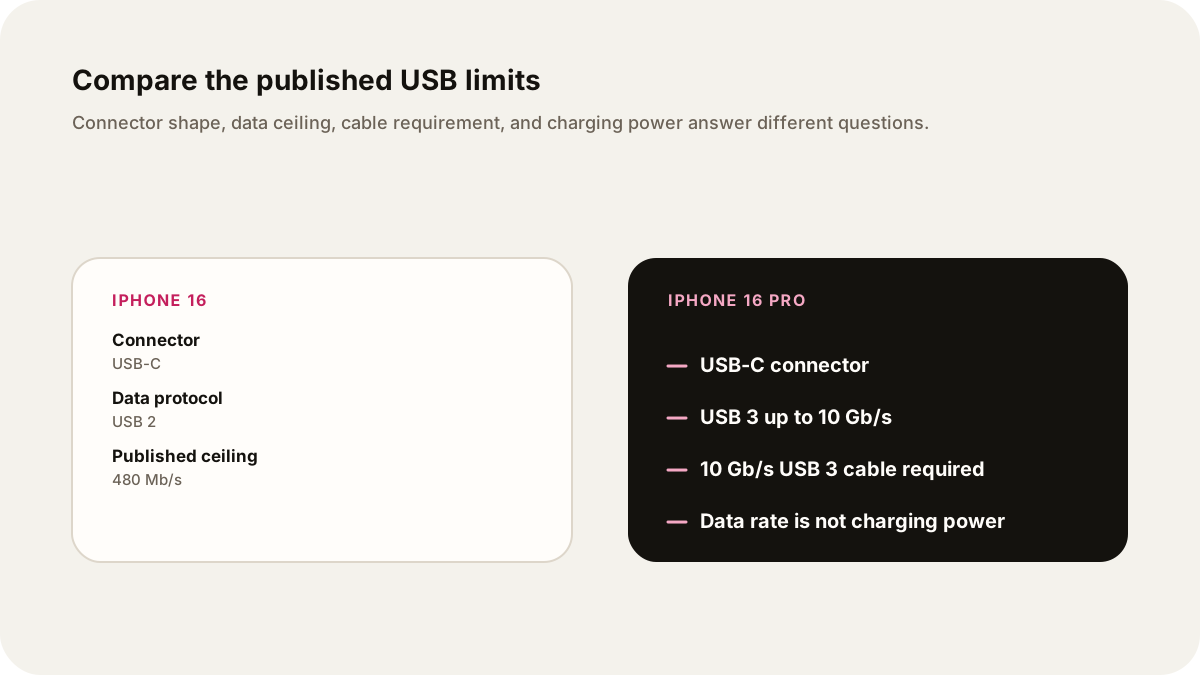
If two phones both have USB-C, you still need a second question: which USB data mode does each phone support? The iPhone 16 and iPhone 16 Pro make the distinction clear. Apple lists USB 2 up to 480 Mb/s for the iPhone 16 and USB 3 up to 10 Gb/s for the iPhone 16 Pro. Those are published interface limits, not promises about every cable, computer, app, or transfer.
Key Takeaways
- The 2024 iPhone 16 lists USB 2 up to 480 Mb/s. The iPhone 16 Pro lists USB 3 up to 10 Gb/s and says a USB 3 cable rated for 10 Gb/s is required.
- USB-C describes the connector shape. It does not prove the same data protocol or speed.
- Data speed in bits per second and charging power in watts answer different questions. Neither is a promise of a live transfer time or charging result.
Begin with the question you actually need answered
Specifications become useful when they answer a decision. “Which phone is better?” is too broad for a source-led audio brief. “If I move a large video file by cable, what published data ceiling should I compare?” is narrow enough to research. “Is the connector USB-C?” is a different question from “Which USB data mode does the phone support?”
This guide uses a historical shipping comparison: the iPhone 16 and iPhone 16 Pro introduced in 2024. It is not a current buying recommendation and it does not claim that either phone is a new 2026 model. The official iPhone 16 technical specifications list a USB-C connector supporting charging, DisplayPort, and USB 2 up to 480 Mb/s. Apple's iPhone 16 Pro specifications list a USB-C connector supporting charging, DisplayPort, and USB 3 up to 10 Gb/s.
Those pages are the evidence for the comparison. The iPhone 16 page is Apple's product specification; the iPhone 16 Pro page is Apple's Support specification. Both pages were accessed on October 7, 2026. A future revision can change a support page, so keep the access date in your research notes and link the exact page in the finished brief.
Read the USB fields as separate claims
| Source feature | iPhone 16 | iPhone 16 Pro | What this does not tell you |
|---|---|---|---|
| Connector | USB-C | USB-C | Same shape does not establish the same data protocol |
| Published data support | USB 2, up to 480 Mb/s | USB 3, up to 10 Gb/s | These are maximum interface rates, not a measured transfer |
| Cable condition | Apple lists a USB-C charge cable in the box | Apple says a USB 3 cable with 10 Gb/s speed is required | A cable can limit the link even when the phone supports more |
| Charging statement | Fast charge up to 50% in 30 minutes with a 20W adapter or higher and a USB-C charging cable | Fast charge up to 50% in around 30 minutes with a 20W adapter or higher and a USB-C charging cable | Apple's test conditions and the phone's state matter; data rate does not become charging power |
| Wireless power listing | MagSafe up to 25W; Qi2 up to 25W | MagSafe up to 25W with a 30W adapter or higher; Qi up to 7.5W | Watts describe power delivery, not file-transfer speed |
The rows combine Apple's published specifications and their footnotes. The table is a reading aid, not an independent benchmark. “Up to” is doing real work in every row. It marks a ceiling or test result under stated conditions, not a promise for every cable, computer, file, temperature, battery state, or app.
Bits, bytes, and a bounded example
Data rates are commonly written in bits per second. File sizes are usually described in bytes. NIST's units reference defines one byte as 8 bits, one MB as 1,000,000 bytes, and one GB as 1,000,000,000 bytes, while MiB and GiB use powers of two. This guide uses those decimal MB and GB meanings. The iPhone 16's 480 Mb/s becomes 60 MB/s in an idealized arithmetic example. The iPhone 16 Pro's 10 Gb/s becomes 1.25 GB/s in the same idealized arithmetic.
Those numbers are not test results. They leave out protocol overhead, cable negotiation, storage speed, computer performance, file handling, thermal conditions, and the path an app uses to move the file. They also do not tell you how long a real transfer took.
For example, imagine a 12 GB file and pretend the published interface ceiling were sustained with no overhead. At 60 MB/s, the arithmetic would be 12,000 MB divided by 60 MB/s, or 200 seconds. At 1,250 MB/s, it would be about 9.6 seconds. This is a worked illustration of units, not a claim that either phone transferred a 12 GB file in that time. A spoken brief should say “idealized calculation” before reading the result.
The comparison is still useful. It shows why a USB 3-capable phone and a suitable cable create a different upper bound from a USB 2 phone. It does not prove that every workflow will be twenty times faster. The two headline rates are in different units, and the real path may have a lower limit.
Do not turn charging watts into data speed
The same connector can carry power and data, but the measurements are different. A 20W adapter describes a charging setup. A 480 Mb/s or 10 Gb/s specification describes a data interface. One cannot be converted into the other.
Apple's fast-charge wording also includes conditions. On the iPhone 16 page, Apple says up to 50% charge in 30 minutes with a 20W adapter or higher paired with a USB-C charging cable. The iPhone 16 Pro page gives similar fast-charge language and separately lists wireless charging limits. These are Apple statements under test conditions. They do not mean a 20W charger supplies 20W continuously to the battery, or that a faster data cable charges faster.
The cable requirement is equally specific. Apple's iPhone 16 Pro page says USB 3 up to 10 Gb/s and identifies a USB 3 cable with 10 Gb/s speed as required. A USB-C cable that charges a phone can still be unsuitable for that data ceiling. The connector's physical shape cannot answer the cable's internal capability.
Keep the source, the lens, and the example separate
An audio brief should tell the listener which words came from Apple and which words are the narrator's explanation. A source claim is “Apple lists USB 2 up to 480 Mb/s.” A selected lens is “For a large wired video transfer, the data row deserves attention.” A worked example is “If a 12 GB file moved at the idealized ceiling, the arithmetic would be 200 seconds.” Those sentences do different jobs.
Use a second table while drafting:
| Layer | Example line | What it cannot establish |
|---|---|---|
| Official specification | “Apple lists USB 3 up to 10 Gb/s for iPhone 16 Pro.” | A real transfer speed on a particular computer |
| Selected question | “Compare the published data ceiling for a large cable transfer.” | That data transfer is the reader's most important phone decision |
| Hypothetical arithmetic | “At an idealized 1,250 MB/s, 12 GB is about 9.6 seconds.” | A benchmark, measured duration, or guaranteed result |
| Practical limit | “A USB 3 cable rated for 10 Gb/s is required for the Pro's listed USB 3 rate.” | That every USB-C cable has this capability |
This distinction lets the brief be useful without pretending to own a test bench. It also gives the listener a simple correction path. If Apple changes a specification page, update the source row and date rather than leaving a calculation floating free of its input.
A personal audio prompt built around one question
Explain the historical 2024 iPhone 16 versus iPhone 16 Pro USB comparison for one question: “What published data ceiling should I consider before moving a large file by cable?” Use Apple's iPhone 16 and iPhone 16 Pro technical specifications checked October 7, 2026. State USB 2 up to 480 Mb/s for iPhone 16 and USB 3 up to 10 Gb/s for iPhone 16 Pro. Explain that the Pro requires a USB 3 cable rated for 10 Gb/s, while the connector shape alone does not identify the protocol. Separately explain Apple's charging claims and listed watts. Work through a clearly labeled idealized 12 GB arithmetic example using bits-to-bytes conversion. Do not call the result a benchmark, promise a transfer time, recommend buying a current phone, or claim that an audio episode or live test was generated.
Before recording, open the two Apple pages beside the script. Keep “up to,” cable requirements, and the access date attached to the facts. If the listener asks about a different cable, computer, app, or current model, treat that as a new research question. The listener chooses what they want to hear, and Lissin makes the show around that choice. Use Contact Lissin to report a correction to this guide. The source links and corrections guide gives the wider source-trail practice.
The guide answers one comparison question with published limits and explicit assumptions. The arithmetic clarifies the units. Only a real, reproducible test could establish the behavior of a particular setup.
Sources
- Apple, iPhone 16 Technical Specifications: USB 2 rate, USB-C connector, charging and wireless-power listings.
- Apple Support, iPhone 16 Pro Technical Specifications: USB 3 rate, 10 Gb/s cable requirement, charging and wireless-power listings.
- NIST, Definitions of the SI units: The binary prefixes: bits per byte and decimal MB/GB versus binary MiB/GiB.
- Lissin About: product context for listener choice.
- Lissin Contact: path to report a correction to this guide.
- Lissin source links and corrections: correction and source-trail practice for generated audio.