
Turn meeting notes into a personal audio brief
A short source-to-audio workflow for hearing what changed in a meeting without turning a suggestion into a commitment.
Meeting notes are useful when they help you answer one question later: what changed, what did we decide, and what happens next? They are harder to use when they preserve every sentence but hide the decisions, proposals, owners, and unanswered questions.
You can turn a finished set of notes into a short personal audio brief by sorting the notes before you write the audio request. The point is not to make a recording of the meeting. It is to make the source easier to revisit while keeping the record close enough to check.
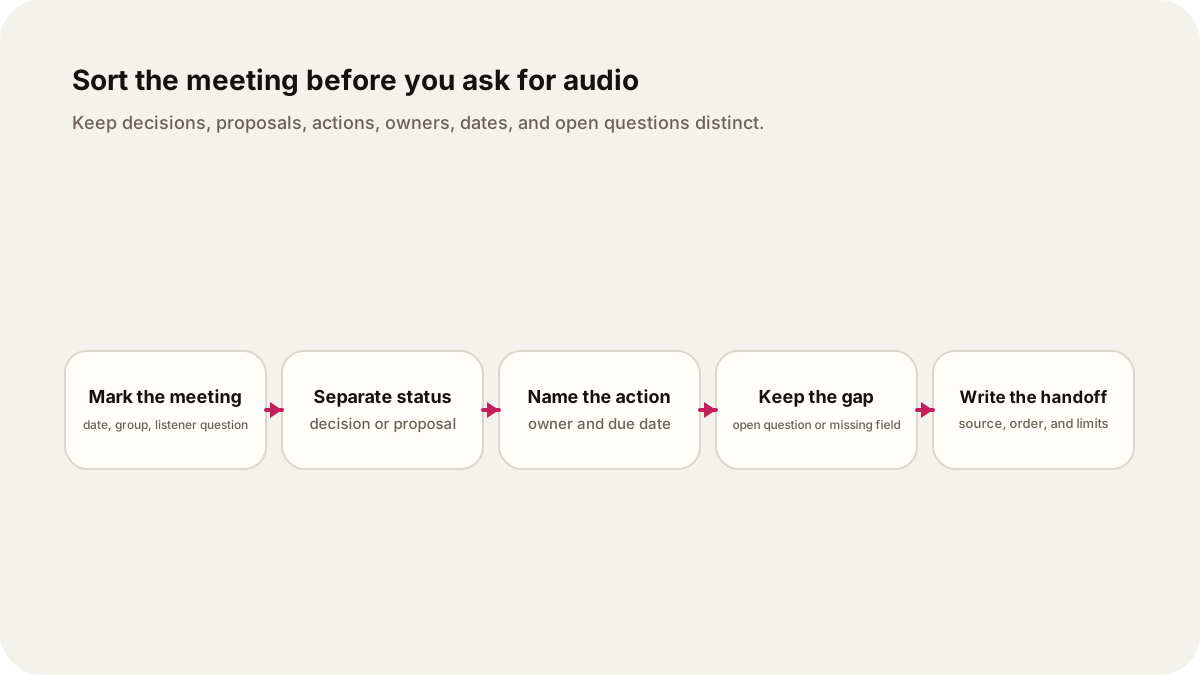
Start with the meeting's job
Write down the meeting date, the group or project, and the question you want the audio to answer. A request such as “summarize these notes” gives the episode too many possible jobs. A bounded question gives it a useful shape:
What did the product team decide about the launch checklist on 7 October, which tasks belong to whom, and what still needs an answer before the next review?
That question tells you what to keep. If the notes do not name a date, owner, or final decision, the brief should say that the information is missing.
Meeting guidance from the University of Toronto's primer on effective meetings says modern minutes should concentrate on actions and agreements rather than reproduce a verbatim conversation. It also recommends recording the meeting details, decisions, alternatives that were not chosen, assigned action items, and expected completion dates. The City of Orlando's meeting guide makes the same practical point: close by reviewing actions and decisions, including who, what, and when.
Sort each note by what it means
Before asking for audio, label each useful line. Four labels cover most working meetings, with a fifth for what remains unresolved.
- Decision: the group chose an option, approved a plan, rejected a proposal, or recorded a vote.
- Proposal: someone suggested an option, but the group did not make a final choice.
- Action: a task was agreed, with an owner and, when available, a due date.
- Owner and date: the person responsible and the date attached to the action. Keep “owner not named” or “date not set” when the notes do not supply them.
- Open question: something that needs evidence, a decision, or a follow-up conversation.
These labels stop a confident sentence in the audio from turning a suggestion into a commitment. Phrases such as “we should,” “let's look into it,” or “can someone check?” may point to an action, but they do not prove that an owner accepted it. The University of Toronto guidance recommends assigning each action to one or more members and including an expected completion date. If either is absent, preserve the gap.
A small example from ordinary notes
Imagine these fictional notes from a launch review:
7 October, launch review
The team discussed whether the help page should launch with the new pricing page. Priya suggested publishing both on Friday. Mateo said support needs a day to review the examples. No vote was recorded.
Decision: the pricing page will stay in the Friday release. The help page will be reviewed again at the next meeting.
Action: Mateo to send support's example edits. Due date was not recorded.
Open question: who approves the final help-page copy?
The distinction matters. “Publish both on Friday” is a proposal. The pricing page staying in the release is a decision. Sending example edits is an action. Mateo is the owner, but the due date is missing. Approval of the final copy is open.
This is the useful material for a brief. The names and disagreement provide context, but the audio does not need every exchange. It needs enough discussion to explain why the help page moved to a later review, and it must say when the notes do not record a date or approver.
Give the audio one listener job
Use the labelled notes as the source, then set a short format and a clear order. A five or six minute episode could use this sequence:
- Identify the meeting, date, and question.
- State the decision, with the option that was not chosen if the notes record it.
- List each action, owner, and due date, keeping missing fields visible.
- Separate proposals from commitments.
- Read the open questions as questions, not as implied work.
- End with the source handoff: the notes, meeting date, and sections used.
Lissin lets you add sources, describe what you want to hear, choose the editorial direction and length, and make a one-time episode. You can build a personal brief around your own question, ask for a practical, neutral tone, and keep the labels in the spoken structure. You do not need to ask it to imitate the meeting or invent a dialogue between attendees.
Here is an illustrative instruction using the fictional notes above:
Make a five-minute personal audio brief from the meeting notes titled “7 October, launch review.” Answer: what was decided about the Friday release, what actions have an owner, and what remains open? Separate decisions, proposals, actions, owners, dates, and open questions. State that Mateo owns the support-example edit, but that the due date is not recorded. Say that no approver for the final help-page copy is named. Treat Priya's Friday suggestion as a proposal, not as the decision. Do not invent a vote, a deadline, a follow-up meeting date, or dialogue. End by naming the meeting date and the notes as the source.
The instruction is exact about the source boundary. It asks for an audio explanation, not a generated meeting record. If the notes contain a formal motion, vote, or compliance requirement, keep the wording and relevant context beside the audio. A personal brief may be shorter, but it should not erase a vote or change a decision's status.
Keep the handoff with the audio
Save the original notes beside the episode link. Record which version you used, the meeting date, and any correction made after the meeting. If a later message supplies Mateo's deadline or names the approver, update the notes and make a new brief or a clearly marked revision. Do not let a fluent voice become the only place where a commitment exists.
Keep one sentence that the audio should not cross: “The notes do not establish that the launch is ready.” That boundary matters when a meeting discusses a plan without approving it, or when one person proposes work that no one accepts. The notes remain the record you check.
The next time you leave a meeting with a page of fragments, begin by asking what you want to know when you return. Mark the decision, proposal, action, owner, date, and open question. Then request one short audio brief that answers that question and says where its limits are. You will have something you can listen to on the way to the next review, with the source still close enough to verify.
Sources
- University of Toronto, Running effective meetings: a primer for doctors: guidance on minutes, decisions, assigned actions, and completion dates.
- City of Orlando, Effective Meetings: guidance on reviewing actions and decisions with who, what, and when.
- Lissin on the App Store: current product description for source-led personal audio shows and one-time episodes.
- How to verify an AI-generated news summary: a related claim-by-claim check for spoken summaries.
- PDF to podcast: build a source brief: a related source-selection workflow for documents.